Virus Removal Guru is here to help you remove viruses and spyware from your computer for free. Currently, it is estimated that tens of millions of computers are infected worldwide with anything ranging from spyware to viruses to adware. Currently, Virus Removal Guru receives tens of thousands of visitors each week and hopes to provide them with solutions to their computer problems. Virus Removal Guru is here to provide advice for free to help you keep your computer clean. It is essential to keep a clean computer to help it run faster and to keep your personal information safe.
Below, you will find updates on new spyware and viruses that come out on the web. Please feel free to comment on any posts since your feedback is useful to other visitors and us.
The three largest infections currently in 2011 are
XP Home Security 2023,
Antimalware Doctor, and
System Tool. Other major infections include
AV Security Suite,
Internet Security Essentials, and
Security Tool.
March 16th, 2024 / No Comments » / by Guru
lpcloudbox302.com is one of many websites on the internet which are used to promote rogue applications which pose as security updates for real applications such as Adobe Flash and Java. For example, the website may try to get the user to download an update to Adobe Flash and have a design similar to a Adobe website whereas in reality the update is a virus or rogue application. A rogue application is an application which doesn’t serve its exact purpose which the user hopes it would. Click here to learn more about rogue applications. The website will try hard to push a download onto the user. The user may be redirected to this website when an ad is served on another website.
Below is our recommended removal tool for popups from websites like lpcloudbox302.com. The removal tool has been rated 5 cows out of 5 by Tucows and was previously CNET’s Editor’s Choice. Feel free to download it below.
Manual Removal – Generally, pop ups will come from adware and browser extensions installed on the user computer. To check and see if these adware can be uninstalled, go to Start –> Control Panel –> Programs –> Uninstall a program.
We recommend that you follow our safety tips so that you can keep your computer clean. Please click here to view our safety tips
Please post comments below. Your comments are both useful to visitors and to us.
Posted in: Suspicious Websites
January 18th, 2024 / No Comments » / by Guru
Win 7 Anti-Virus 2023, also known as Windows 7 Antivirus 2023, is a fake antivirus application. While Win 7 Anti-Virus 2023 symbol is the Windows logo, the program is not associated with Windows or with Microsoft. The program will pose as a real antivirus application when in reality it is a fake antivirus application. Once installed, Win 7 Anti-virus 2013 will scan and provide a fake scan on the computer. Once complete, it will provide a fictitious scan result in hopes that the user will purchase the program.
When attempting to run Internet Explorer, Win 7 Anti-Virus 2023 will not allow the user to visit websites on the internet even through the internet is working. The main workaround is to right click on the Internet Explorer icon and click “Run as Administrator.” The application is one of many fake computer security applications released in January 2023. The most prominent previous version of Win 7 Anti-Virus 2023 was called Win 7 Security 2023.
The executable for Win 7 Anti-Virus 2023 is similar to AV.exe and AVE.exe, which are the main executable of previous clones of this virus. Win 7 Anti-Virus 2023 will modify the registry; therefore, the registry must be fixed before removing the main executable file. The comments for AV.exe and comments for AVE.exe may provide insight into the successful removal of Win 7 Anti-Virus 2023. These two pages have roughly a combined 170 comments.
The good news is that the fake antivirus application can be removed. Below is our recommended removal tool for Win 7 Anti-Virus 2023. The removal tool has been rated 5 cows out of 5 by Tucows and was previously CNET’s Editor’s Choice. Feel free to download it below.
We recommend reading through our removal tips if you plan to manually remove Win 7 Anti-Virus 2023. The user comments for Win 7 Security 2023 will also assist in the manual remove of Win 7 Anti-Virus 2023. Win 7 Anti-Virus 2023 will create a warning about Trojan-BNK.Win32.Keylogger.gen and an Internet Explorer alert.
View Win 7 Anti-Virus 2023 Files
View Win 7 Anti-Virus 2023 Keys
Manual Win 7 Anti-Virus 2023 Removal –
Stop Win 7 Anti-Virus 2023 Processes (Learn How To Do This)
[random letters].exe
Each computer will have a different process for Win 7 Anti-Virus 2023. However, the process will always consist of three lower cased random letters.
Remove Win 7 Anti-Virus 2023 Files (Learn How To Do This)
C:\Users\[username]\AppData\Local\[random letters].exe
Turn on “show hidden files” and turn off “hide protected operating system files” in order to see the main files for Win 7 Anti-Virus 2023. This feature can be found in the folder options in the view tab.
Remove Win 7 Anti-Virus 2023 Registry Keys (Learn How To Do This)
HKEY_CURRENT_USER\Software\Win 7 Anti-Virus 2023
HKEY_LOCAL_MACHINE\SOFTWARE\Win 7 Anti-Virus 2023
HKEY_LOCAL_MACHINE\SOFTWARE\Microsoft\Windows\CurrentVersion\Uninstall\Win 7 Anti-Virus 2023
Remove Win 7 Anti-Virus 2023 Startup Entry (Learn How To Do This)
[random letters].exe
Win 7 Anti-Virus 2023 can be removed with many different methods. Therefore, please feel free to share a solution that may have used to remove Win 7 Anti-Virus 2023.
Posted in: Rogue Application Removal
January 2nd, 2024 / No Comments » / by Guru
Internet Crime Complaint Center Department of Federal Bureau of Investigation Virus is defined as ransomware, which is essentially malicious software which holds the computer ransom from the user demanding payment in return to allow the user to access to the computer. The virus will effective take control of the computer and demand payment, making it a challenge to remove. Ransomware software is not a new type of virus, with Internet Crime Complaint Center FBI Virus being one of many ransomware software on the internet that have been released this year. Each version presents itself to the user as a government entity asking for payment for a crime (for this virus, it is the Department of Federal Bureau of Investigation). For the Internet Crime Complaint Center FBI virus, the top line will state “You have been violating copyright and related rights law (video, music, software) and illegally using or distributing copyrighted content, thys infrining Arcticle I, Section 8, Clause 8, also known as the copyright of the criminal code of the United States of America.”. The software asks for payment through moneypak (which is likely unusual for a government agency). In addition, the ransomware will lock the computer to make it inaccessible to the user, making it a challenge to remove. The Internet Crime Complaint Center FBI Virus is essentially a scam and should be removed to stop further damage to the computer.
Since the Internet Crime Complaint Center FBI virus locks the computer, the following steps must be followed in order to remove the Internet Crime Complaint Center FBI Virus.
1. The computer will need to be started in safe mode with networking because the computer in inaccessible in regular mode. To enter safe mode, restart the computer and immediately press F8 multiple times after the computer powers on (and before the Windows screen) to bring up the boot options. The following options will be shown:
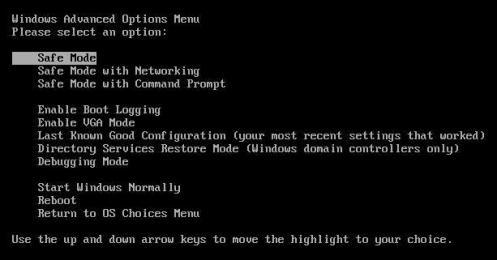
Safe mode with networking will allow the user to use the internet in safe mode. Once in safe mode with networking, the user can remove the Internet Crime Complaint Center FBI Virus. Some versions of the malicious software will block safe mode; therefore, the user will need to find a boot cd to attempt a removal.
Once in safe mode with networking, the user can scan for removal of the Internet Crime Complaint Center FBI virus. Below is our recommended removal tool for the Internet Crime Complaint Center FBI Virus. The removal tool has been rated 5 cows out of 5 by Tucows and was previously CNET’s Editor’s Choice. Feel free to download it below.
The virus can also be removed manually. The challenge is that the virus uses a random file name, making it a challenge to find. Below are instructions on how to manually remove the virus.
Stop the Internet Crime Complaint Center FBI Virus Processes (Learn How To Do This)
[random letters and numbers].exe
Remove the Internet Crime Complaint Center FBI Virus Files (Learn How To Do This)
C:\Users\[username]\AppData\Roaming\[random letters and numbers].exe
Please feel free to share a solution that you may have used to remove the Internet Crime Complaint Center FBI Virus. If you have any questions, please feel free to ask below.
Posted in: Malware Removal

